
What is Redpanda?
In recent years, modern architectures have evolved toward increasingly distributed systems, where dozens or even hundreds of applications need to exchange information in real time. In this context, Redpanda emerges as a message streaming platform designed to transport data quickly, scalably, and efficiently between different services and applications.
Redpanda can be understood as a central communication infrastructure for modern systems. Its main function is to receive, store, and distribute messages in real time. A message can be virtually any action generated within a digital platform, for example: a user logging in, a payment made, an order created, an IoT sensor sending data, or an application generating logs. All of this happens in milliseconds and in a decoupled manner.
Although frequently compared to Apache Kafka, Redpanda is not simply “another Kafka.” Its goal is to offer the same data streaming capabilities and compatibility with the Kafka ecosystem, but eliminating much of the operational complexity that has traditionally accompanied this type of technology.
One of the main differences is its architecture. While Kafka was built on Java and for years relied on additional components like ZooKeeper, Redpanda was developed from scratch in C++ with a much more modern approach, optimized for current hardware and cloud environments. This allows it to offer lower latency, more efficient CPU and memory usage, and considerably simpler deployments.
Furthermore, Redpanda maintains compatibility with the APIs and tools of the Kafka ecosystem. This means that many existing applications, clients, connectors, and pipelines can run on Redpanda without major modifications. In practice, this makes it easier for companies to adopt the technology without having to rebuild their entire data infrastructure.
Another important aspect is its focus on simplicity. Redpanda aims to reduce the operational burden associated with traditional streaming platforms. It installs and runs as a single binary, requires less configuration, and is designed to minimize maintenance tasks—something especially valuable in cloud environments and microservices architectures.
Thanks to these features, Redpanda has gained popularity in sectors where real-time processing is critical, such as SaaS platforms, fintech, observability, artificial intelligence, IoT, and advanced analytics systems. Its value proposition combines high performance, Kafka compatibility, and a much lighter user experience.
In short, Redpanda represents a new generation of data streaming platforms: technologies designed to move large volumes of information in real time, but adapted to today's needs for simplicity, scalability, and efficiency.
The Problem It Addresses
The growth of distributed architectures, microservices, and real-time applications has led companies to constantly need to move massive amounts of data between systems. Today, virtually every digital platform continuously generates messages: users navigating an application, payments being processed, sensors sending information, services communicating with each other, or systems logging activity for monitoring and analytics.
For years, technologies like Apache Kafka became the standard for solving this problem. Kafka enabled the construction of highly scalable platforms capable of processing millions of messages per second, becoming a fundamental component in many modern architectures. However, as its adoption grew, certain difficulties related to its operation and maintenance also began to emerge.
One of the main problems was operational complexity. Kafka not only required managing the broker cluster itself, but also additional components such as ZooKeeper in its traditional versions, as well as advanced configurations related to replication, storage, partitioning, JVM tuning, and performance optimization. For many companies, especially small teams or startups, properly operating a Kafka environment could become a complex and costly task.
Added to this was resource consumption. Kafka is developed on Java and depends on the JVM virtual machine, which implies more demanding memory and CPU management. In cloud environments, where every resource used has a direct economic cost, maintaining large Kafka clusters can considerably increase infrastructure spending.
Another common problem arose in scenarios where low latency and simplicity were required. Many organizations wanted to take advantage of the benefits of message streaming without having to
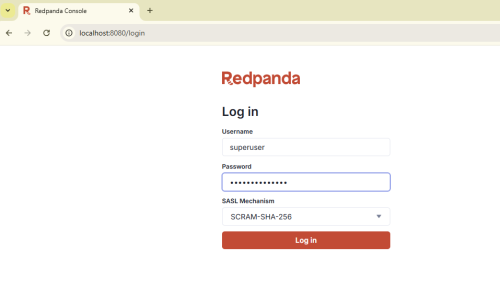
To access the console once the Redpanda containers are running, go to localhost:8080/admin. The default credentials are "superuser" and "secretpassword".
The first thing you'll see on the main page is the cluster status, health, and brokers.
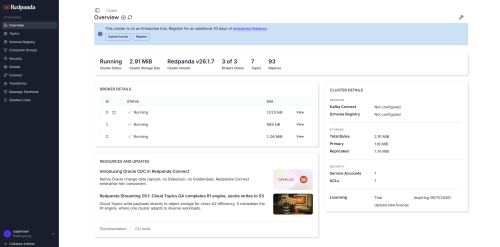
To view details for a specific broker, select the "view" option.
To view the available topics, select the "topics" section.
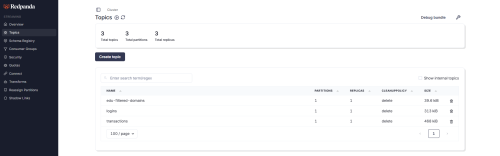
To create a topic, click the "create topic" option.
To view information about an existing topic (for example, one of the three default topics), click on the topic to open its window.
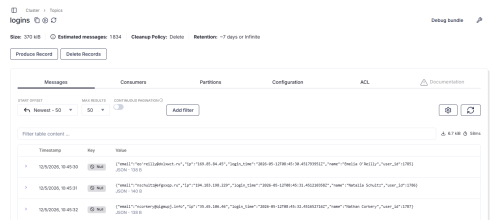
This panel includes options such as sending or deleting messages from a topic, adding search filters, and viewing topic-related information such as consumers, partitions, and various configurations, in addition to the messages themselves.
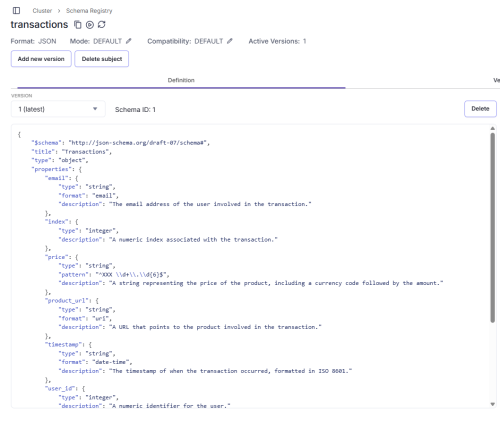
Another feature of the console is the ability to create "schemas," which are structural definitions that all messages within a topic must follow. For example:
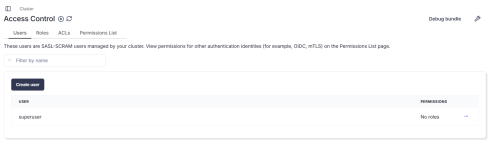
The Security section in Redpanda is the area of the system responsible for controlling access to all cluster resources, defining who can interact with the data and under what conditions.
In a streaming system like Redpanda, not all users or services should have the same permissions, since information flows can be sensitive or critical. Therefore, security is based on establishing clear rules that regulate access.
Within this section, various elements can be managed. These include users, representing both individuals and applications that connect to the system; roles, which group specific permissions to facilitate administration; and access control lists (ACLs), which allow for very precise definition of what each user can do with each system resource.
These rules can be applied at different levels. For example, a user can be granted read permissions on a specific topic, such as "logins," but prevented from writing or deleting data. Similarly, another user might have write permissions on an "orders" topic, but not access to topics related to payments or sensitive information.
A practical example would be an architecture with multiple services. An authentication microservice might have permission to write login messages, while an analytics system would only have read access to that data. Meanwhile, a payment service could only access topics related to transactions, thus avoiding any unnecessary exposure of information.
In this context, security not only serves to protect data, but also to maintain order and separation of responsibilities among the different components of the system. This is especially important in distributed environments, where multiple teams and services interact with the platform simultaneously.
Security is enabled by default in demo mode in development or quick start environments like ours, but it can be configured according to the deployment (Docker, Kubernetes, etc.) and set to be enabled, for example, only for production environments.
Other functionalities accessible through the Redpanda web interface go beyond basic work with topics, producers, and consumers, and are primarily geared towards advanced cluster administration and more complex production scenarios.
Among them is Redpanda Connect, a tool that allows you to build data pipelines to integrate the system with external sources such as databases, cloud storage, or APIs, facilitating the movement and transformation of information without the need to develop additional code.
It is also possible to manage partition reallocation, a feature designed to balance the load within the cluster. This allows you to move partitions between different brokers to optimize performance or react to failures or node saturation, thus ensuring more stable system operation.
Another available section is quotas, which allows you to set usage limits for users or services. With this functionality, you can control, for example, how many messages per second a producer can send or how many resources a consumer can consume, preventing a single service from impacting the overall performance of the cluster.
At more advanced levels, we also find transforms, which allow for the processing and transformation of messages in real time directly within the data stream. This makes it possible to modify, filter, or enrich messages without needing to send them to external processing systems.
Finally, there are shadow links, a feature geared towards complex distributed architectures, which allows for the replication or synchronization of data between different clusters—something especially useful in multi-region or high-availability scenarios.
Together, these options represent advanced Redpanda capabilities that complement the system's basic use and bring it closer to real-world production scenarios, where information is not only consumed and produced, but the entire data stream is also integrated, controlled, and optimized globally.
Redpanda CLI (rpk)
This is the terminal-based tool that allows you to perform operations via the command line (many of these can be done from the console, but Redpanda also offers this option).
The username and password of the aforementioned superuser must be entered in each command (or another user can be created if you want to test the security aspects, but for this test, the superuser will be used). This can be avoided by creating profiles to store the username and password information for that rpk session.
Examples of some basic commands: (in this demo, they are from within the container)
View cluster status:
> rpk cluster info -X user=superuser -X pass=secretpassword
List topics:
> rpk topic list -X user=superuser -X pass=secretpassword
Create a topic:
> rpk topic create demo-topic -X user=superuser -X pass=secretpassword
Producer (send messages):
> rpk topic produce demo-topic -X user=superuser -X pass=secretpassword
(and then write; each line is one message)
Consumer (read messages):
> rpk topic consume demo-topic -X user=superuser -X pass=secretpassword
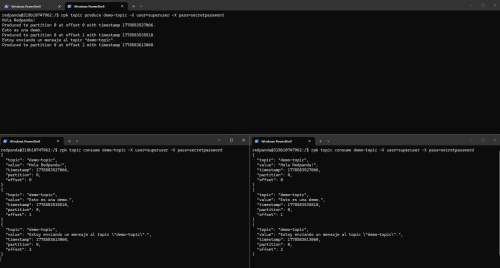
The following image shows a very simple example of a producer and two consumers in real time.
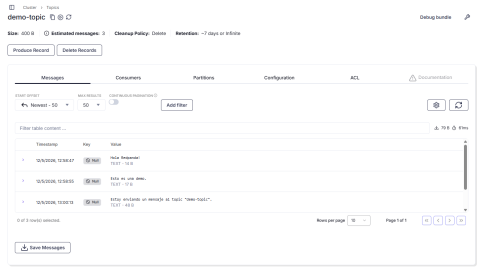
Furthermore, as you can see in the following image, the created topic and messages are also visible in the web interface. Additionally, we can use various tools such as creating, deleting, or filtering messages.
Java Integration Example
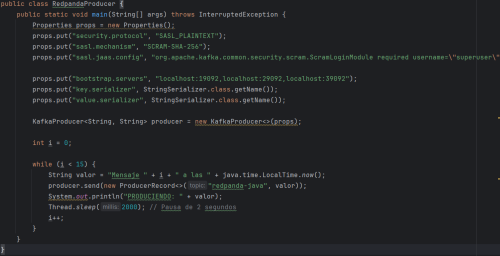
For the Java example, two classes are presented: a producer and a consumer. The connectors are exactly the same as if using Kafka, the same "kafka-clients" library in the pom.xml file, and the same classes. Therefore, Redpanda is said to be compatible with Kafka; you simply need to change the address where the brokers are located, and the code would be the same.
For the producer, classes like KafkaProducer or ProducerRecord are used. The following image shows the RedpandaProducer class.
Classes like KafkaConsumer or ConsumerRecord are used for the consumer. The RedpandaConsumer class is shown in the following image.
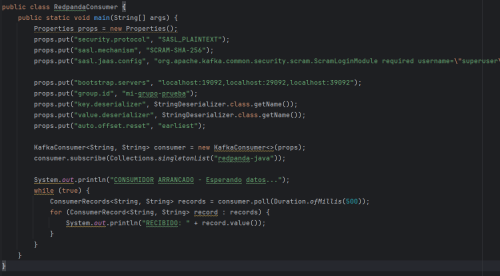
For both classes, you need to set properties such as server addresses, security configurations, username and password, etc.
To run this simple example, simply start Redpanda as described in the previous section, then start the consumer, and finally the producer.
Advantages over Apache Kafka
Redpanda's advantages over Apache Kafka are best understood by comparing their construction and practical operation, rather than by functional differences visible to the user.
One of the main advantages is performance and latency. Because it is developed in C++ and uses a native architecture without a virtual machine or garbage collector, Redpanda tends to offer more stable and predictable latency, especially under high load, avoiding the internal pauses typical of JVM-based systems like Kafka.
Another important advantage is operational simplicity. Redpanda is designed as an "all-in-one" system, where the broker itself includes many integrated capabilities without the need to deploy additional complex components. In Kafka, on the other hand, it's common to rely on more ecosystem components (such as ZooKeeper in older versions or external services in modern architectures), which can increase deployment and maintenance complexity.
Resource consumption is also a key factor. Thanks to its core-based execution model (without thread blocking), Redpanda typically makes better use of modern hardware and requires less fine-tuning to scale, while Kafka may need more configuration to achieve optimal performance in demanding scenarios.
Finally, Redpanda offers a more unified experience for developers and operations, as it includes integrated tools such as a console, CLI, and administrative features that simplify daily work with the system.
Use Cases
Redpanda's use cases focus on scenarios where large volumes of data need to be processed in real time, especially when low latency and operational simplicity are important. Being compatible with the Apache Kafka ecosystem, it can be used in many of the same contexts, but with advantages in performance and ease of deployment.
One of the most common use cases is real-time message processing, such as application logs, system metrics, or user activity. For example, every time a user logs in, performs an action, or generates a message on a platform, that data can be sent to Redpanda for instant processing by analytics, monitoring, or anomaly detection systems.
Another very common use case is microservices architecture. In these types of systems, Redpanda acts as a central message bus where different services publish and consume information in a decoupled manner. For example, an order service can send messages when a purchase is created, and other services such as billing, inventory, or shipping react to those messages independently.
It is also used in real-time analytics systems, where it is necessary to continuously process data to generate dashboards or indicators updated in real time. This is especially useful in sectors such as e-commerce, fintech, or digital platforms, where information is constantly changing and has immediate value.
Another relevant case is the ingestion of data from multiple sources, such as databases, APIs, or external systems. With tools like Redpanda Connect, this data can be centralized into a continuous stream that feeds storage systems, machine learning, or post-processing.
In general, Redpanda is used in any architecture where data is not processed in batches, but rather as a continuous flow of messages that must be captured, transported, and processed in real time.
When to choose Redpanda and when to choose Kafka?
Choosing between Redpanda and Apache Kafka depends more on the project context than on direct functional differences, since both fulfill the same objective: processing messages in real time.
In general, Redpanda is often chosen when operational simplicity and rapid deployment are desired. It is a good option for small or medium-sized teams, modern cloud environments, or projects where managing a large amount of infrastructure is not desired. It is also a good fit when the priority is low latency and stable performance without requiring much configuration, especially in real-time analytics, observability, or data pipelines.
Kafka, on the other hand, is usually the preferred option in environments where a consolidated ecosystem already exists around it, or when maximum maturity, historical compatibility, and a very broad ecosystem of tools and connectors are required. This is common in large organizations that have been building architecture on Kafka for years and have teams
In summary, Redpanda is chosen more for its efficiency and ease of use in modern architectures, while Kafka remains a very solid choice when long-term stability is a priority.
Performance Comparison
For the performance comparison between Redpanda and Kafka, the data obtained from the following official documentation is available:
https://www.redpanda.com/blog/redpanda-vs-kafka-performance-benchmark
This document shows that Redpanda's performance is superior to Kafka's, and it also demonstrates that the hardware cost is lower.
First, it explains the characteristics and conditions of each benchmark, and then it compares performance at different write speeds.
The conclusions of the above document are shown in the following table.
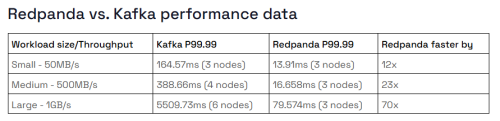
As can be seen, the greater the workload, the more Redpanda's performance advantage over Kafka increases.
Conclusion
In conclusion, Redpanda appears as a modern evolution of the message streaming model popularized by Apache Kafka, maintaining compatibility with its ecosystem while significantly simplifying its deployment and operation.
Its main value lies in reducing infrastructure complexity, improving the user experience, and offering more predictable performance thanks to its native C++ architecture and core-oriented design. This makes it especially attractive for teams that want to work with real-time data without assuming the typical operational burden of more traditional systems.
Kafka, for its part, remains a very robust and widely adopted option, with a mature and proven ecosystem in large organizations, which keeps it as a standard in many enterprise environments.
Overall, it's not so much that one "replaces" the other in every case, but rather that Redpanda offers a more modern and simplified alternative for many scenarios, while Kafka remains a safe bet for established or highly complex architectures.
Official Redpanda documentation: https://docs.redpanda.com/current/home/

Francisco Fernández
Software Technician


